


How to Do It
Prerequisites
-
- **OS / App Version Requirements**: Android 14 introduced features that are enhanced in Android 15. While enabling Live Captions is generally consistent across versions, Android 15 may offer more refined controls.
-
- **Risks**: Enabling features might affect device performance. Always back up your data through Settings → System → Backup before making changes.
<h3>Step-by-Step Instructions</h3>
<ol>
  <li>To enable Live Captions, open your device's **Settings** app.</li>
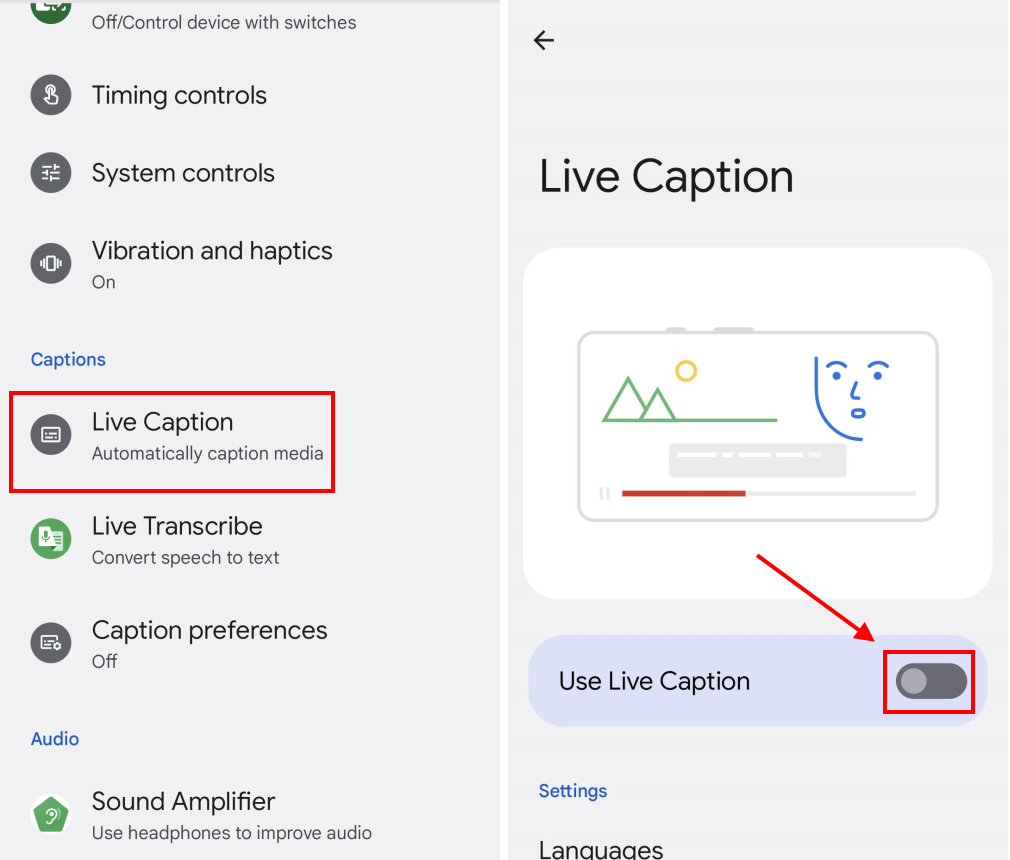
  <li>Navigate to <kbd>Accessibility → Live Caption</kbd>.</li>
  <li>Toggle the switch to enable Live Captions. A notification will confirm its activation.</li>
  <li>Test it by playing a video or audio; captions should appear automatically.</li>
  <li>Check customization options under <kbd>Settings → Accessibility → Live Caption → Caption Appearance</kbd> to change text size, style, and background color.</li>
</ol>
<p><strong>Verify it worked:</strong> Play any media with sound to see if captions appear.</p>
Best Practices, Tips & Pitfalls
-
- Keep your device updated to the latest software version to utilize the newest features and improvements.
-
- Adjust caption settings based on personal preferences, as they can be customized for visibility and readability.
-
- If captions do not appear, check your sound settings; Live Captions work only when sound is played from your device.
-
- Explore third-party apps for advanced captioning options if the built-in feature isn’t sufficient.
-
- Test captions in different apps to see how they perform across various platforms.
Alternatives & Comparisons
While Android’s built-in Live Captions feature is robust, several alternatives exist across different OEMs. Here’s a comparison table of popular options:
| Option | Best for | Trade-offs |
|---|---|---|
| Samsung One UI | Integrated experience in Samsung devices | May lack some customization options |
| MIUI | Customizability and additional features | Heavy UI can slow down older devices |
| OxygenOS | Smooth experience with less bloat | Limited features compared to MIUI |
Key Takeaways
-
- Live Captions can be easily enabled through the Accessibility settings on Android devices.
-
- Each OEM has its own version of Android, which can affect the performance and features of Live Captions.
-
- Customization options enhance the user experience and ensure captions are readable.
-
- Regular updates ensure you have access to the latest features and improvements.
FAQ
How do I know if my device supports Live Captions?
Check your device’s settings under Accessibility. If Live Captions is listed, your device supports it.
<h3>Can Live Captions be used offline?</h3>
<p>Yes, Live Captions work offline, but the experience may vary based on the media being played.</p>
<h3>What should I do if Live Captions are not working?</h3>
<p>Ensure your device's sound is active and double-check the settings to confirm that Live Captions are enabled.</p>
