- 1. Understanding Gaming Hardware
- 2. Gaming Technologies
- 3. Performance Optimization
- 4. Game Streaming Platforms and Equipment
- 5. Esports and Competitive Gaming
- 6. Budget and High-End Builds
- 7. Tips for PC and Console Gaming Enthusiasts
- 7.1. Keep Drivers Updated
- 7.2. Optimize Your Internet Connection
- 7.3. Monitor Game Performance
- 7.4. Community Engagement
- 7.5. Stay Informed
- Conclusion
As the gaming landscape continues to evolve in 2025, the demand for powerful gaming laptops has surged. With the introduction of new technologies, gaming hardware, and optimization techniques, gamers are now more equipped than ever to enjoy immersive experiences. This comprehensive guide will cover everything you need to know about gaming laptops, from the latest hardware to performance optimization and gaming technologies.
1. Understanding Gaming Hardware
1.1. Gaming PCs vs. Consoles vs. Laptops
When choosing a gaming system, it’s essential to understand the differences between gaming PCs, consoles, and laptops:
-
Gaming PCs: Known for their upgradability and raw power, gaming PCs typically offer superior performance compared to laptops and consoles. They can be customized for specific needs, allowing for high-end gaming experiences.
-
Consoles: Consoles like the PlayStation 5 and Xbox Series X provide an excellent gaming experience with exclusive titles and streamlined performance. However, they lack the upgrade capabilities of a gaming PC.
-
Gaming Laptops: Gaming laptops offer portability without sacrificing much performance. They are equipped with powerful GPUs and CPUs, enabling gamers to enjoy high-quality graphics and fast frame rates on the go.
1.2. Key Hardware Components
1.2.1. Processors (CPUs)
In 2025, the most common CPUs for gaming laptops include:
-
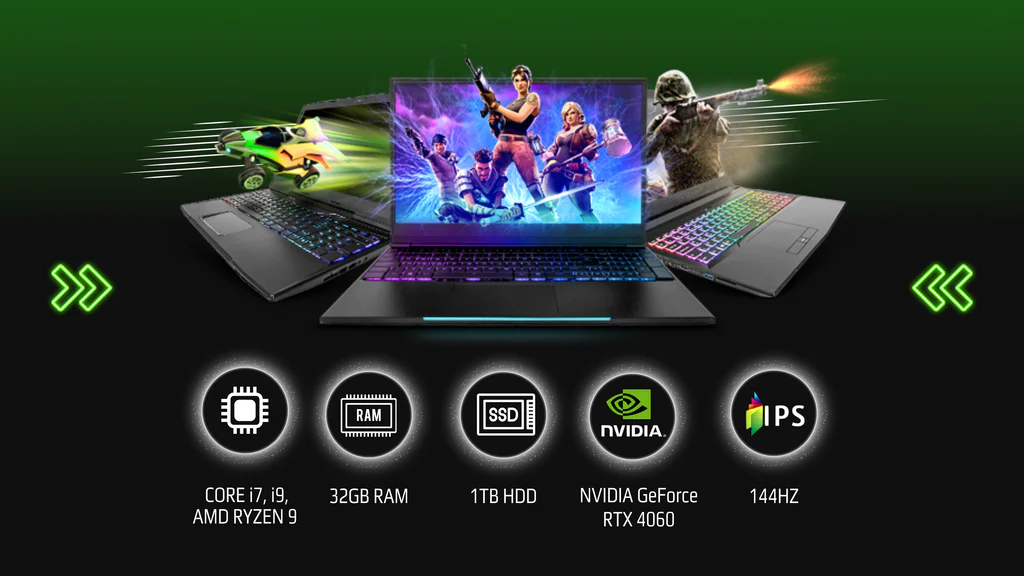
Intel Core i9-13900HX: Known for its high clock speeds and multi-core performance, making it ideal for gaming and multitasking.
-
AMD Ryzen 9 7945HX: Offers a competitive edge in multi-threaded applications and gaming performance with its high core count.
1.2.2. Graphics Cards (GPUs)
The GPU is the heart of gaming performance. Key GPUs to look for in gaming laptops include:
-
NVIDIA GeForce RTX 4000 Series: Features advanced ray tracing capabilities and DLSS (Deep Learning Super Sampling) for enhanced visuals and performance.
-
AMD Radeon RX 7000 Series: Provides solid performance with a focus on high-resolution gaming.
1.2.3. RAM and Storage
-
RAM: At least 16GB of RAM is recommended for gaming, with 32GB being ideal for heavy multitasking and streaming.
-
Storage: SSDs are essential for fast load times. Look for laptops with NVMe SSDs for the best performance, ideally with at least 1TB of storage.
1.3. Displays
A quality display enhances gaming experiences. In 2025:
-
Refresh Rates: Look for displays with at least 144Hz refresh rates for smoother gameplay.
-
Resolution: 1440p (QHD) is becoming the standard, with 4K options available for those who prioritize visuals.
-
Panel Types: IPS panels offer better color accuracy and viewing angles, while TN panels provide faster response times.
1.4. Input Devices
1.4.1. Keyboards
-
Mechanical Keyboards: Preferred for their tactile feedback and durability, with RGB lighting for customization.
-
Laptops: Gaming laptops often feature mechanical-like switches for a satisfying typing experience.
1.4.2. Mice
-
Wired vs. Wireless: While wired mice typically offer lower latency, wireless technology has advanced significantly, making high-quality wireless mice a viable choice.
-
DPI Settings: Look for adjustable DPI settings to suit different gaming genres.
1.4.3. Headsets
-
Surround Sound: Look for headsets that offer surround sound for an immersive audio experience.
-
Comfort: Lightweight designs with good cushioning are essential for long gaming sessions.
2. Gaming Technologies
2.1. Ray Tracing
Ray tracing simulates realistic lighting conditions, enhancing the visual quality of games. Supported by NVIDIA’s RTX series and AMD’s RX 7000 series, this technology is becoming standard in modern titles.
2.2. DLSS (Deep Learning Super Sampling)
DLSS uses AI to upscale lower-resolution images, providing better performance without sacrificing quality. This allows gamers to experience high frame rates while enjoying detailed graphics.
2.3. Virtual Reality (VR)
VR gaming continues to grow, with platforms like Oculus Quest 3 and Valve Index pushing the boundaries of immersion. Laptops must have powerful GPUs to handle the demands of VR.
2.4. Cloud Gaming
Cloud gaming services such as NVIDIA GeForce NOW, Xbox Cloud Gaming, and PlayStation Plus offer the ability to play high-end games on low-end hardware via streaming. This technology makes gaming more accessible but relies heavily on internet speed.
3. Performance Optimization
3.1. Frame Rate Increases
To maximize FPS:
-
Game Settings: Adjust graphics settings to balance quality and performance. Lowering settings like shadows and texture quality can significantly improve FPS.
-
Resolution Scaling: Use resolution scaling techniques to enhance performance while maintaining visual fidelity.
3.2. Overclocking
Overclocking your CPU and GPU can lead to substantial performance gains, but it requires careful management of temperatures:
-
Software Tools: Use applications like MSI Afterburner for GPU overclocking and Intel XTU for CPUs.
-
Cooling Solutions: Ensure adequate cooling with external cooling pads or upgraded internal cooling solutions to prevent overheating.
3.3. Cooling Solutions
Effective cooling is critical for maintaining performance:
-
Internal Cooling: Look for laptops with advanced thermal management, such as vapor chambers and multiple heat pipes.
-
External Cooling: Use cooling pads to improve airflow around your laptop during intense gaming sessions.
4. Game Streaming Platforms and Equipment
4.1. Capture Cards
For those looking to stream gameplay, a capture card is essential.
-
Elgato HD60 S+: Offers exceptional performance for streaming in 1080p60 with low latency.
-
AverMedia Live Gamer 4K: Best for high-end streamers looking to capture in 4K resolution.
4.2. Stream Decks
Stream decks allow for quick access to commands and controls during streaming:
- Elgato Stream Deck: Highly customizable with programmable buttons for quick scene changes and audio controls.
4.3. Software Solutions
-
OBS Studio: Free, open-source software for streaming that offers a wide range of customization options.
-
Streamlabs: Provides additional features tailored for streamers, including alerts and overlays.
5. Esports and Competitive Gaming
5.1. The Rise of Esports
Esports has exploded in popularity, with events like The International (Dota 2) and the League of Legends World Championship drawing millions of viewers. Understanding the competitive scene can help aspiring gamers.
5.2. Building a Competitive Setup
To compete at a high level:
-
High Refresh Rate Monitors: Essential for fast-paced games like FPS and MOBA titles.
-
Low Latency Equipment: Invest in wired peripherals to minimize input lag.
5.3. Training and Skill Development
-
Practice Routines: Establish a regular practice schedule focusing on mechanics, strategy, and teamwork.
-
Coaching: Consider hiring a coach or joining a team to gain insights into competitive play.
6. Budget and High-End Builds
6.1. Budget Builds
For gamers on a budget, consider the following:
-
Mid-Range GPUs: Options like the NVIDIA GeForce RTX 3060 or AMD Radeon RX 6600 can provide excellent performance without breaking the bank.
-
Refurbished Models: Look for refurbished or slightly older models that still offer solid performance.
6.2. High-End Builds
For enthusiasts seeking top-tier performance:
-
Flagship GPUs: Invest in GPUs like the NVIDIA GeForce RTX 4090 and high-end CPUs for unparalleled performance.
-
Custom Cooling Solutions: Consider laptops with advanced cooling systems to support overclocking and prolonged gaming sessions.
7. Tips for PC and Console Gaming Enthusiasts
7.1. Keep Drivers Updated
Regularly updating your graphics drivers can enhance performance and compatibility with new games.
7.2. Optimize Your Internet Connection
A stable and fast internet connection is crucial for online gaming. Consider using a wired connection for the best reliability.
7.3. Monitor Game Performance
Use software tools to track FPS and system performance. This helps identify bottlenecks and areas needing improvement.
7.4. Community Engagement
Engage with gaming communities for tips, tricks, and support. Platforms like Reddit, Discord, and gaming forums offer valuable resources.
7.5. Stay Informed
Stay updated with the latest gaming news, hardware releases, and software updates. Subscribing to gaming magazines, blogs, and YouTube channels can help keep you informed.
Conclusion
The gaming landscape in 2025 is more exciting than ever, with advancements in technology, hardware, and gaming experiences. Whether you’re a casual gamer or a competitive player, understanding the nuances of gaming laptops and equipment will help you make informed decisions, optimize performance, and elevate your gaming experience. As you navigate this dynamic environment, remember that the right tools and knowledge can significantly enhance your gaming journey. Happy gaming!